Reviews
Reviews List
Browse, filter, and manage every individual review across all connected platforms.
Go to Review Platform → Reviews.
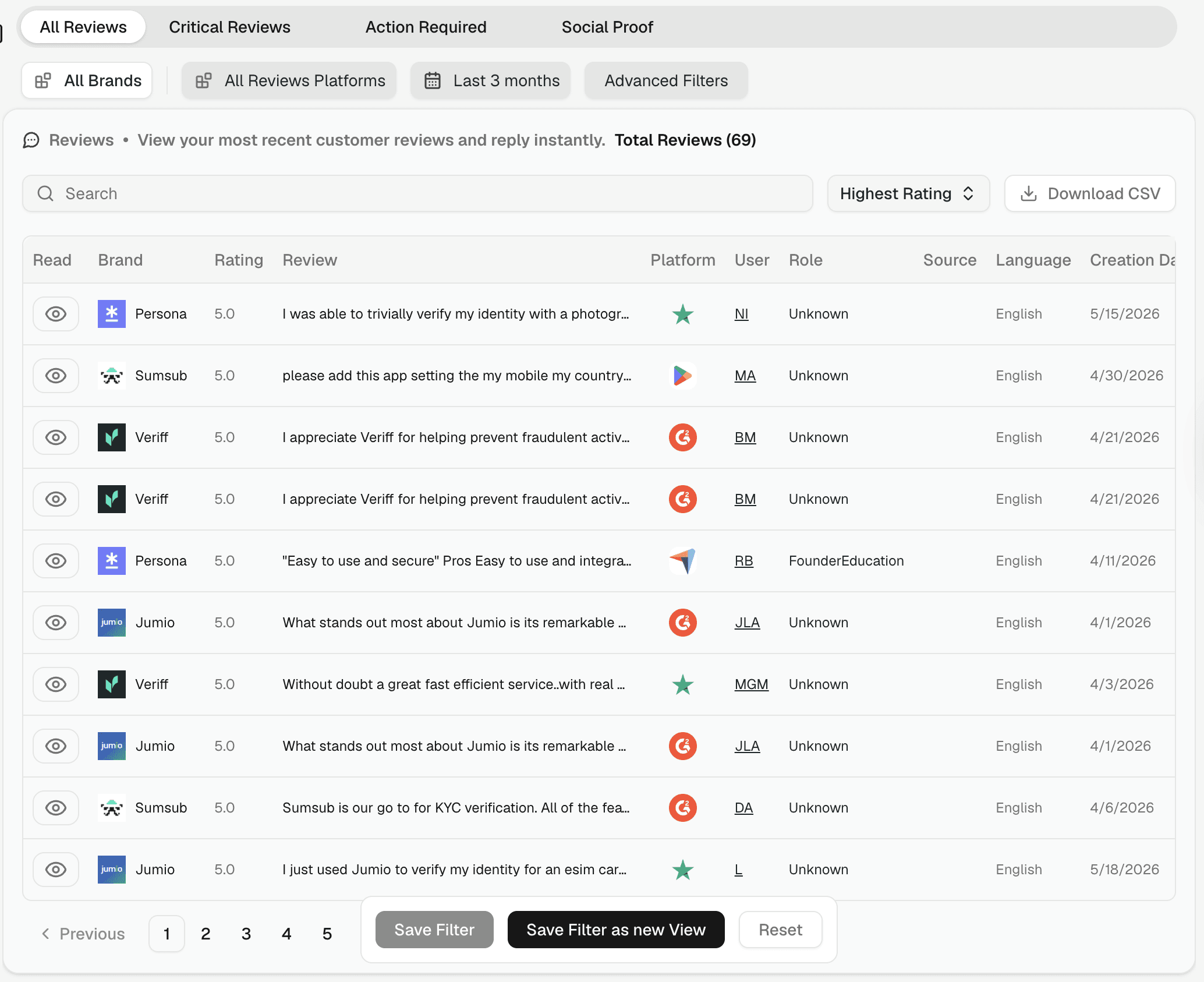
Tabs
Four tabs give you instant pre-filtered views:
All Reviews — every review, newest first
Critical Reviews — low-rating reviews that may need a response
Action Required — reviews flagged as needing follow-up
Social Proof — high-rating reviews useful for marketing
Review columns
Each row shows: Read status, Brand, Rating, Review text, Platform, Reviewer, Role, Source, Language, and Creation Date.
Filtering
Use the filter bar to narrow by brand, platform, and time range. Click Advanced Filters for additional options:
Read Status — All, Read, or Unread
Ratings — specific star ratings
Languages — filter to reviews in a particular language
💡 Use Critical Reviews daily to stay on top of low-rating reviews. Use Social Proof when you need testimonials for sales or marketing.
Saving filters
Once you've built a filter combination you'll reuse, save it at the bottom of the page:
Save Filter — saves the current filter settings
Save Filter as new View — saves as a named view accessible from the sidebar
Reset — clears all active filters
See Saved Views & Filters for more.
Exporting
Click Export CSV in the top-right to download all reviews matching your current filters. See CSV Export.